
Overview
The MA-10P Series PPP GNSS Receiver is designed to support QZSS MADOCA and CLAS PPP services.
The MA-10P series hardware has now been upgraded to v2.
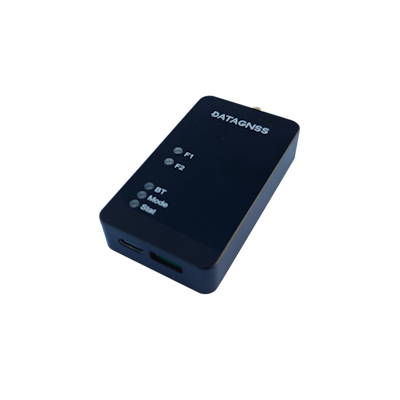
If you are using the v1 version, please refer to MA-10P v1.
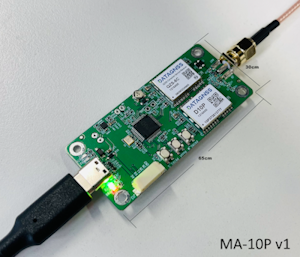
If you are using the DGM10-PPP series, please refer to DGM10-PPP.
The MA-10P series v2 is available in the following two models:
| Item Desc. | P/N | Remark |
|---|---|---|
| MADOCA PPP | MA10P-02-PPP-00 | MADOCA/PPP, L1+L5,L6 |
| CLAS PPP-RTK | MA10P-02-CLAS-00 | CLAS/PPP-RTK, L1+L5,L6 |
MA-10P v2 support USB serial and TTL UART output.
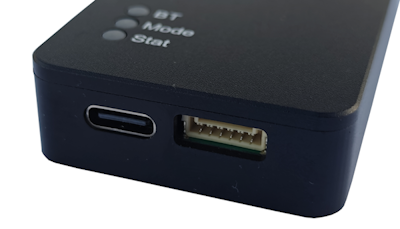
We recommend using the AT400 L1/L2/L5/L6 antenna with the MA-10P v2.
Specifications
GNSS
| Parameter | Specifications |
|---|---|
| Constellations | GPS, QZSS, BDS, Galileo |
| Channel | 128 hardware channels |
| Update rates | 1Hz |
| Position accuracy | GNSS 1.5m CEP |
| CLAS/PPP-RTK** | ~0.065m (H) ~0.095m (V) |
| Converage(CLAS) | 40s (RTK Float), 60-120s (RTK Fixed) |
| Reliability | >99.9% |
| Protocol | NMEA-0183 |
| Baudrate | 230400 bps (USB Serial) by default, 115200 bps (6P UART) by default |
| Operating condition | Main supply 4.75-5.25V |
| Power consumption | Tracking GNSS 30 mA @ 3.3V <br>Single system 18 mA @ 3.3V <br>Standby Data backup 16 uA <br>RTC 1.4 uA |
| Serial | UART, 6 pins, 1.25mm pitch |
| USB | USB serial |
| Environmental conditions | Operating temp. -40°C to +85°C <br>Storage temp. -40°C to +90°C <br>Humidity 95% RH |
**tested in open sky environment, use AT400 antenna
PINOUT
MA-10P
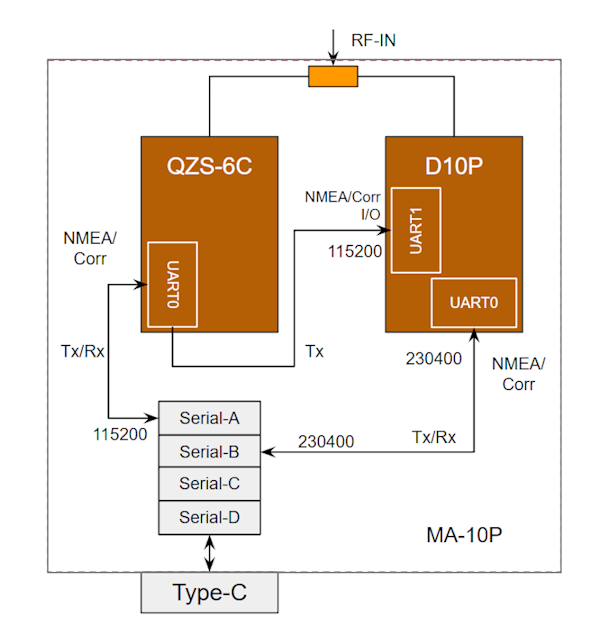
MA-10P support USB UART (230400 bps) and 6P connector UART output (115200 bps).
6P connector [JST-GH-1.25mm, 6P] UART only support output, not input.
6P UART (J13) output Baudrate 115200 bps in default.
DGM10-PPP
DGM10-PPP support 6P connector output (JST-GH-1.25mm). Each pin is defined and labeled on the cable’s marking. Specifically, M1_TX and M1_RX are the ports used by the MADOCA/CLAS module.
You can directly connect to a computer or mobile device using the included 6P-UART-USB converter board via a standard USB Type-C cable for UART communication.
The default baud rate is 230400 bps.
Whether it’s the MA-10P or the DGM10-PPP series, both output data in the NMEA format.
Blockgram
How to use it
Please download Satrack software to test the functions of MA-10P/DGM10-PPP receiver.
Download Satrack from here
Instructions
MA-10P
For MA-10P, please refer to the following instructions:
- Connect your MA-10P to PC/LAPTOP via USB cable. Download USB Driver
- Check your ports for MA-10P receiver in device manager, for example the following picture:

If usb driver installed, there is 4 serial ports in device managerf, USB Serial A,B,C and D.
- USB Serial A : Aux port, QZS-6C, for QZSS correction service, baud rate 115200bps
- USB Serial B : Main port, D-10P, PPP receiver, baud rate 230400bps
- USB Serial C : not connected
- USB Serial D : not connected
USB Serial B is the main port you need to use. Check which COM port corresponds to USB Serial B; in the picture above, it is COM4.
This means you can open COM4 in Satrack and set the baud rate to 230400bps.
After the MA-10P receiver obtains PPP correction data, it starts PPP processing and displays the RTK Float status.
DGM10-PPP
For DGM10-PPP, connect the type c to your PC or laptop, there is only one USB uart port, baud rate is 230400bps.
Then it will output NMEA data.
MADOCA/CLAS
For MADOCA services, typically within 1-3 minutes, a fast RTK Float solution is achieved (indicated by a GPS quality of 5 in the NMEA GGA statement).
The initialization time, which depends on the environment, generally ranges from 10 to 30 minutes. Once initialized, accuracy can reach approximately 0.1-0.6 meters.
For CLAS services, typically within 1-3 minutes, a fast transition to RTK Float mode is observed (indicated by a GPS quality of 5 in the NMEA GGA statement).
Depending on the environment, this is followed by the RTK convergence phase, which generally takes 2-3 minutes for initialization. Once initialized, accuracy can reach approximately 0.06-0.12 meters.
It supports 1Hz only for solutuion output now.
Test report
Please download this MADOCA test report